
bittorrent automation with Linux and rtorrent
Since I download regularly legit files via torrent, and I don't own an Android phone ;), I created a setup that makes life really simplier.
At home I've a 24/7 server (a fanless epia me6000 with debian) that shares part of its filesystem via NFS and samba. After downloading the .torrent file, I simply put it in a shared directory (say, /data/download on the server's filesystem). The server is configured to check every N seconds to look for .torrent files in that directory and, eventually, start the download. After the download is finished, the torrent client moves the files in a specified directory, always shared trough the network via NFS or samba.
I'll describe below the steps needed for a such setup.
Filed under "Home Automation"
This is the very way I intend "Home Automation" applications :)
To start things rolling, a few days later Androidandme set a challenge to its readers - create an Android-compatible BitTorrent application to scan UPC barcodes and find related torrents on the larger BitTorrent search engines. [...] Users would be able to find and start torrents remotely, and the music album or movie would be fully downloaded by the time they got home. Once the product is positively identified, the software should be able to send the results directly to a BitTorrent search engine, such as The Pirate Bay or Mininova. After the search results appear, the user could then choose which torrent to start. Once selected, the .torrent file would be downloaded and sent to the webUI of uTorrent and the download would begin, hopefully ready for when the user reaches his or her home machine. No typing input would be required for the above.
I think it could be even better if the application could recognize the movie (and its metadata) starting from a picture of a poster (read: in front of a cinema) and then start the torrent client at home...
[ via AndroidAndMe]
Why people that work with computers seem to have a lot of spare time
Reasons why people who work with computers seem to have a lot of spare time
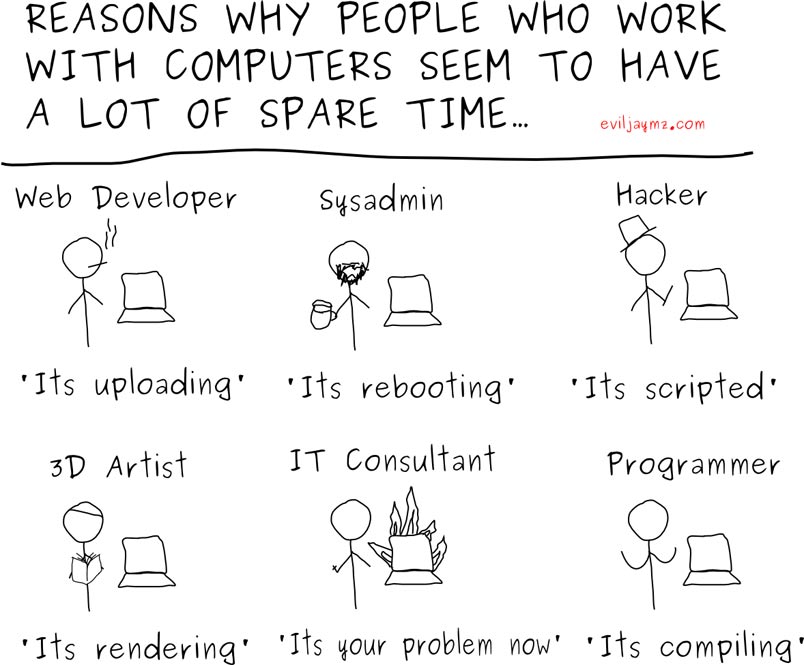
Since I'm an IT Auditor, I'll file me under "IT Consultant", but I challenge any of my clients to tell me "I have a lot of spare time"... :/
World Builder by Bruce Banit
Sharp your weapons: the SSD Project
The Electronic Frontier Foundation (EFF) has created this Surveillance Self-Defense site to educate the American public about the law and technology of government surveillance in the United States, providing the information and tools necessary to evaluate the threat of surveillance and take appropriate steps to defend against it.

Surveillance Self-Defense (SSD) exists to answer two main questions: What can the government legally do to spy on your computer data and communications? And what can you legally do to protect yourself against such spying?